GLAccountRetainedEarnings Function
Definition
The GLAccountRetainedEarnings function returns the total account balance for all transactions under the umbrella of Income, Cost of Goods Sold, Expense, Other Income and Other Expense up to the start of the fiscal year selected in the function arguments. Because debits and credits help determine the direction of the signs for account balances, the accounts listed above are simply added together to get the Retained Earnings balance value.
Function Arguments
| Argument Name | Input Information | Required |
|---|---|---|
| Subsidiary | Subsidiary Name | Yes |
| Beginning Fiscal Year | Beginning Fiscal Year in the format specified in NetSuite | Yes |
| Period Range | Valid values include ITD, YTD, RTD, QTD, PTD, TTD | Yes |
| Book | Book Number. Default is 1 if omitted. | No |
| Item | Item ID | No |
| Class | Classification Name | No |
| Department | Department Name | No |
| Location | Location Name | No |
| Entity | Entity Name | No |
| Transaction Type | Transaction Type | No |
| Currency | If left blank, will default to the currency defined by the Subsidiary. Currency Names are listed in the Data Retrieval section of the ribbon. | No |
| Custom Segment Parameters | Custom segment filter values. Multiple custom segments can be specified. | No |
Remarks
- Because Retained Earnings is totaling the amount based on all transactions up to the start of the selected Fiscal Year, no period argument is required.
- While very similar in inputs to the other balance functions, the Retained Earnings function does not require an account number input as it is consolidating transactions from many accounts.
- The GLAccountRetainedEarnings function is automatically added to the Trial Balance Standard Report template to ensure the balance totals to zero as it does in NetSuite if everything is set up correctly.
Important
Only Period Range of "YTD" will return a non-zero amount as this is the only time Retained Earnings will need to be evaluated.
Example
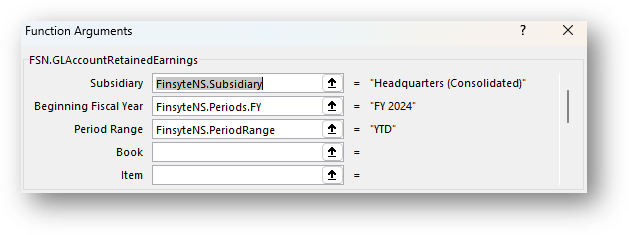
Let's say you would like to see the total GL Account Retained Earnings Balance up to the Beginning of FY 2024. Utilize the GLAccountRetainedEarnings function to return this.
- Have your primary required parameters already in cells at the top of your report.
- Select Finsyte Functions > GLAccountRetainedEarnings
- Fill in the required input parameters
- See the account balance for Retained Earnings returned.

Note
The GLAccountRetainedEarnings function does allow for drill down to view by segments, subsidiaries, and transaction lines. Refer to the Drill Down feature for more information.