Subsidiary Has Access Field in GL Accounts List
If the GL Accounts List is selected from the Data Retrieval section of the Finsyte ribbon, there will be a field that appears at the end of the list called SubsidiaryHasAccess which is used for easily determining the filtered list of accounts relative to a subsidiary.
Select the cell where the title SubsidiaryHasAccess is present.
Choose the dropdown button that appears to the right. This will pull up a list of all accessible Subsidiaries by name.
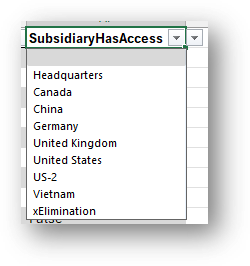
At the time of selecting a subsidiary name, the column will filter each row to return True or False based on if the subsidiary utilizes that account number. The column header will also adjust to display the subsidiary name.
Next, select the dropdown on the same header that's physically inside of the cell (on the left). This will allow you to filter on True meaning only accounts used under the selected subsidiary are now visible.
This list can then be used to set up reports or review accounts.
Note
To remove the filter, simply clear the filter on True. The subsidiary list will remain available for futher use.