Comparative Income Statement Template
A Comparative Income Statement is a financial statement that presents a company’s revenues, expenses, and net income for two or more periods side by side. This format allows stakeholders to easily analyze changes in operating performance over time, identify trends, and evaluate profitability through variance analysis.
Unlike a standard income statement that shows results for a single period, a comparative income statement displays multiple periods (typically two consecutive fiscal years) in adjacent columns, along with variance calculations showing both absolute and percentage changes.
Utilizing the Comparative Income Statement Template
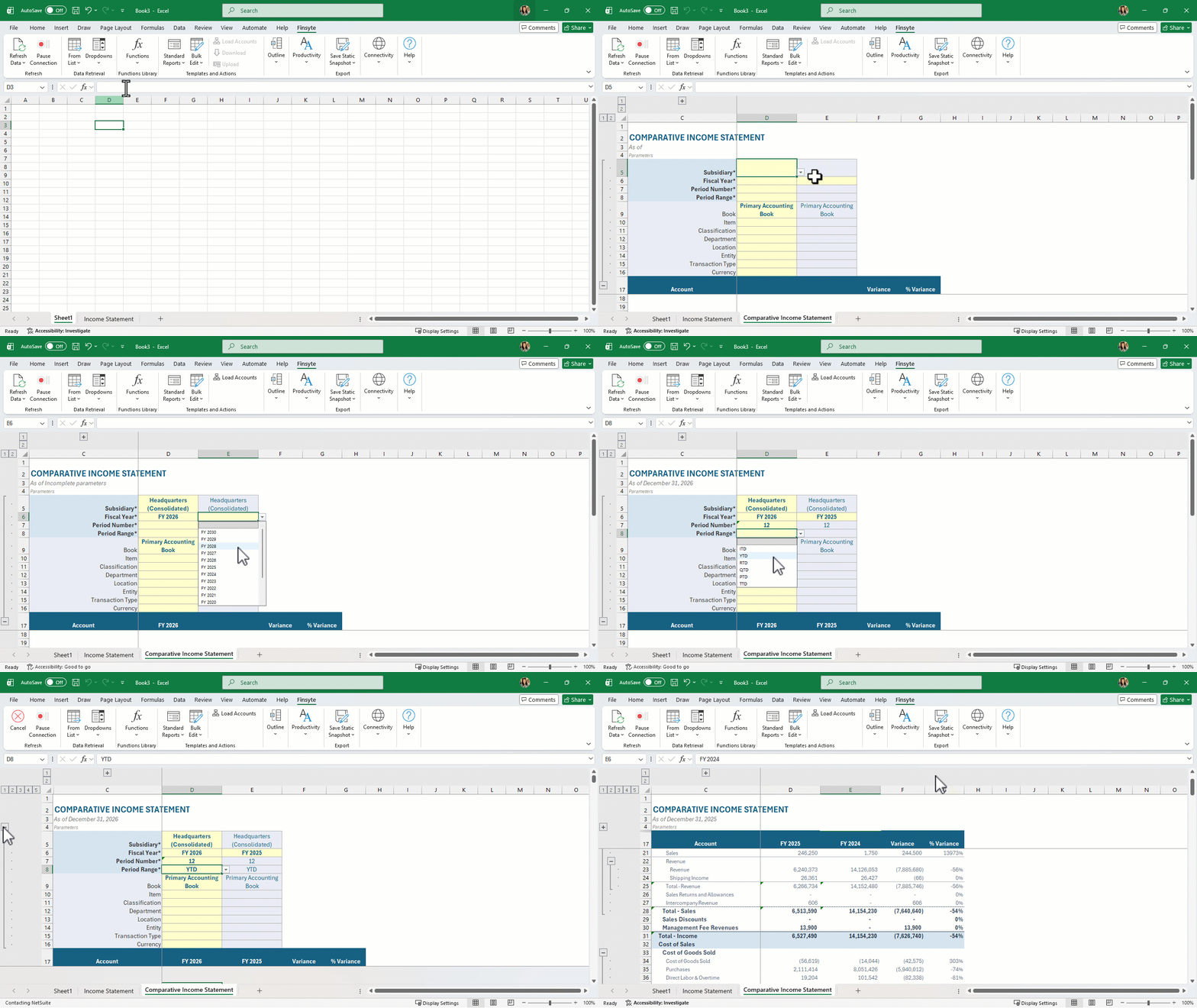
- Select Standard Reports > Income Statement > Comparative Income Statement
- View the new sheet that has been created called Comparative Income Statement
- Fill in all required parameters (asterisks by the names)
- Select the now activated button in the ribbon under Actions of Load Accounts. Finsyte will go to NetSuite to return the appropriate list of GL Account numbers and balances based on the identified Subsidiary input.
- Adjust parameters as needed. If subsidiary is adjusted, account list may change which means the Load Accounts action should be selected again after subsidiary adjustment.
- The Switch Signs operation has already been applied to corresponding account sections.
Remarks
- By default, the Comparative templates are set up to evaluate two years and produce amounts, Variance and % Variance. Adjusting the subsidiary, period number, or another segment in column E could also be done to compare different values in this way.
- Review the GL Accounts list to understand what accounts will be available for the income statement. Every account that falls under the system generated account of FSN_L0_INC will be returned. The Parent column in this table also helps to determine the tree structure seen in the template.
- Review the Subsidiary column in the GL Accounts list to understand which accounts utilize which subsidiaries. The SubsidiariesHasAccess column generated by Finsyte can also be insightful for this.
- If a change is made to the subsidiary input field in your template, please select Load Accounts again to properly return the correct account list as it may change.
- Aggregate functions are utilized on the totals for groups in the financial statement to ensure proper totaling.
- The accounts under Income have reversed signs for totaling purposes.