BudgetAccountBalance Function
Definition
The BudgetAccountBalance function returns budget account balances from existing NetSuite budgets based on a series of parameters.
Function Arguments
| Argument Name | Input Information | Required |
|---|---|---|
| Subsidiary | Subsidiary Name | No |
| Fiscal Year | Fiscal Year in the format specified in NetSuite | Yes |
| Period | Period Number (ex: 1 for January) | Yes |
| Period Range | Valid values include ITD, YTD, RTD, QTD, PTD, TTD | Yes |
| Account Number | Account Number | Yes |
| Budget Category | Budget Category | Yes |
| Book | Book Number. Default is 1 if omitted. | No |
| Item | Item ID | No |
| Class | Classification Name | No |
| Department | Department Name | No |
| Location | Location Name | No |
| Entity | Entity Name | No |
| Reserved | Reserved (ignored) | No |
Remarks
If any optional parameters are left blank, the budget account balance returned will be a consolidation of all values disregarding the segment. For example, if I did not fill in a location for my budget account balance, the returned amount will be a summary of any and all budgets given the filled in parameters regardless of if they have a location filled in or not.
This is important to understand because the Budget Template does not work this way. Budgets in NetSuite can be set up either with segments filled in, or without, but if a user asks for a budget to be returned to Excel with the Budget Template and they have not filled in a segment (like location), that budget will only reference the budget in NetSuite with no location rather than all budgets in NetSuite regardless of whether they have location or not.
Example
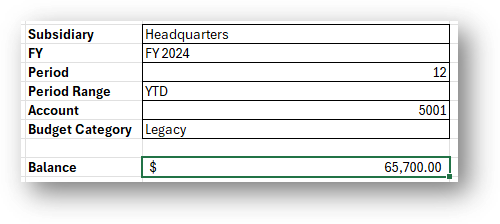
Let's say I want to return the forecasted balance total for my Purchases account (5001) under the Headquarters Subsidiary for Period 12. I can use the BudgetAccountBalance function to quickly return this value.
- Create an Excel spreadsheet that includes input cells for Subsidairy, Fiscal Year, Period, Period Range, Account and Budget Category
- In a cell below this set up, select Finsyte Functions > BudgetAccountBalance
- Link all of your cells into the function arguments and select OK.
- See the outputted Budget Account Balance
Note
BudgetAccountBalance function has the right-click ability to go to the budget inside of NetSuite. Review the Go To Budget feature for more information.